... project dossier
The Kinetic Portfolio
A Technical Deep Dive into a 3D WebGL Portfolio Site
... case study
Full Record
[long form]
Most portfolio sites are flat. You click a link, a new page loads, you scroll. It works, but it is forgettable.
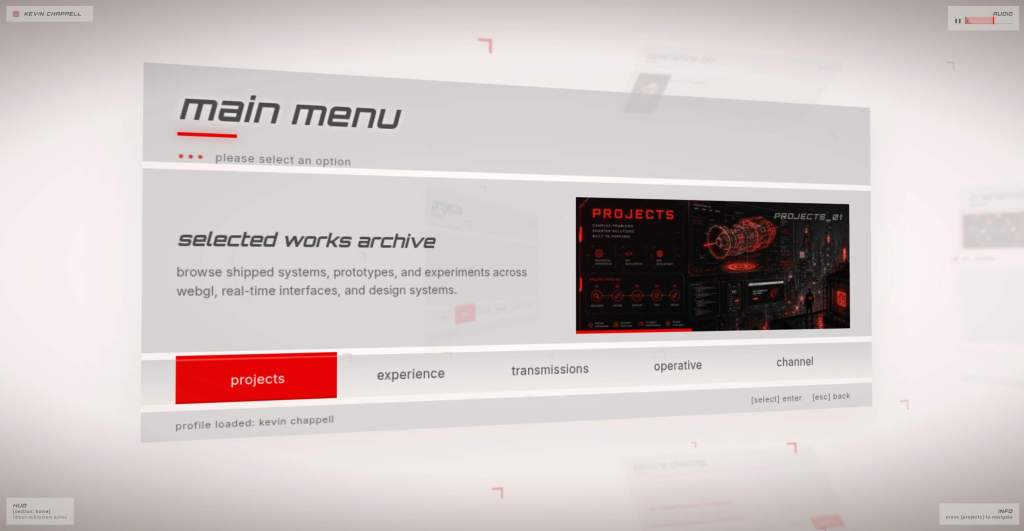
What if your portfolio felt like a cinematic experience? What if navigation was a camera journey through a 3D space, with ribbons blazing a path between sections and content floating on glass panels?
That is The Kinetic Portfolio, an immersive 3D WebGL portfolio site inspired by the Colin McRae: DiRT (2007) navigation UI. Despite the game’s name, the menu system is one of the cleanest UIs I have ever seen. Just look at this.
The Core Architecture
Persistent Canvas
The most fundamental design decision: the 3D scene never unmounts.
// App.tsx
<BrowserRouter>
  <Canvas frameloop="demand">
    <Scene />
    <RouteSync />
  </Canvas>
</BrowserRouter>
App.tsx mounts a single <Canvas> at the root inside <BrowserRouter>. The <Scene> component never unmounts on route change. Route changes only update Zustand state (currentRoute), which drives camera waypoints and panel visibility.
This means:
- No loading spinners between routes
- No texture re-uploads
- No shader recompilation
- Smooth camera transitions between every section
Single Source of Truth
The entire app state lives in one Zustand store (src/store/index.ts). This includes:
SCENE_LAYOUT— exact 3D camera positions, targets, and panel transforms for each routecurrentRoute— the active route IDtransitionStatus—idle|transitioninghoveredElement— for hover statesactiveItemId— for panel selection
Debug state lives in a separate debugSlice that is merged into the same store, exposing free-camera mode and waypoint capture tools.
RouteSync Bridge
RouteSync is a small component that bridges React Router URL changes to Zustand state:
function RouteSync() {
  const location = useLocation();
  const { setRoute, setActiveItemId } = useStore();
  useEffect(() => {
    const route = pathToRoute(location.pathname);
    setRoute(route);
  }, [location.pathname]);
}
When the URL changes, RouteSync updates currentRoute in the store. The camera rig watches currentRoute and animates to the corresponding waypoint. Content updates reactively.
The Ribbon Transition System
The ribbon transition is the signature feature — a volumetric red arrow that blazes a path between sections.
How It Works
- User clicks a navigation item
transitionStatusswitches totransitioning- React Router navigates to the new path
- The Ribbon component mounts and GSAP animates
uProgressfrom 0→1 - A custom GLSL shader fades
uOpacityduring the transition - On
onComplete,transitionStatusresets toidle
The Shader
The ribbon uses a custom vertex and fragment shader. The vertex shader displaces vertices along a bezier curve path, and the fragment shader applies a gradient with glow:
// Fragment shader (simplified)
uniform float uProgress;
uniform float uOpacity;
uniform vec3 uColor;

void main() {
  float glow = smoothstep(0.0, 1.0, uv.x);
  vec3 color = mix(uColor, vec3(1.0), glow * 0.5);
  gl_FragColor = vec4(color, uOpacity * (1.0 - uv.y));
}
Performance Guard
Pointer events are disabled while transitionStatus !== idle. This prevents users from clicking through multiple sections during a transition and stacking animations.
Post-Processing Pipeline
The visual polish comes from a multi-pass post-processing stack using the postprocessing library:
<PostProcessing>
  <SMAA />
  <DepthOfField focus={dofFocus} />
  <Bloom luminanceThreshold={0.9} />
  <MotionBlur intensity={0.5} />
</PostProcessing>
- SMAA — Subpixel Morphological Anti-Aliasing for clean edges
- Depth of Field — Focuses on the active panel, blurs background elements
- Bloom — Adds glow to bright elements (ribbons, highlights)
- Motion Blur — Custom shader pass that creates a subtle trail effect during camera movement
Camera Rig
The camera system is the heart of the experience. It uses GSAP for waypoint-driven camera transitions:
// Camera waypoint definition
const WAYPOINTS = {
  home: { position: [0, 2, 10], target: [0, 0, 0] },
  projects: { position: [5, 3, 8], target: [3, 1, 0] },
  blog: { position: [-5, 2, 8], target: [-3, 0, 0] },
  // ...
};
Idle Camera Drift
When idle, the camera drifts with layered sine waves plus mouse parallax:
function useIdleDrift(time: number) {
  const x = Math.sin(time * 0.3) * 0.2 + Math.sin(time * 0.7) * 0.1;
  const y = Math.cos(time * 0.5) * 0.15;
  return [x, y, 0];
}
This creates a subtle breathing effect that makes the scene feel alive without being distracting.
Adaptive Quality
The portfolio monitors frame time and automatically degrades DPR (device pixel ratio) when performance drops:
// If frame time exceeds 16.67ms (60 FPS budget)
if (frameTime > 16.67) {
  setDPR(Math.max(1, currentDPR - 0.1));
}
This ensures smooth performance even on lower-end hardware. The target is 60 FPS on an M1 MacBook Air with fewer than 80 draw calls.
Content Pipeline
The portfolio supports two content modes:
- Fixture mode (
USE_FIXTURES = true) — All content served fromsrc/data/content.tsfor development - Live mode — Content fetched from WordPress via GraphQL using
@graphql-codegen
Mobile Experience
The portfolio detects WebGL support and viewport size:
- Desktop — Full 3D experience with
DesktopExperiencecomponent (lazy-loaded) - Mobile — CSS-based fallback with
MobileExperiencecomponent
Build-Time Prerendering
SEO is handled through build-time prerendering with dynamic metadata and JSON-LD structured data. Each route generates a static HTML shell with proper <title>, <meta> tags, and structured data for search engines.
Design System
The portfolio follows strict design conventions:
- 0px border-radius everywhere — sharp, geometric aesthetic
- No 1px solid dividers — uses shadows and depth instead
- CSS variables for all colors (
--kv-accent: #e90000,--kv-bg: #FCF9F2) - Panel chrome — consistent header, tabs, options list, and status bar via
PanelChromecomponent
Performance Budget
Target: 60 FPS on an M1 MacBook Air with fewer than 80 draw calls. Route transitions complete in approximately 350ms.
Lessons Learned
What Worked Well
- Persistent canvas — The single biggest performance win. No scene teardown/rebuild between routes.
- Zustand for state — Simple, fast, and easy to debug. No provider nesting.
- GSAP for animations — Reliable timing, easy to chain, great
onCompletecallbacks. - Adaptive quality — Graceful degradation on lower-end hardware.
What Was Hard
- Camera transitions — Getting the easing right took a lot of iteration. Too fast feels jarring, too slow feels sluggish.
- Post-processing tuning — Bloom and DOF can easily make the scene look washed out. Finding the sweet spot took time.
- Mobile fallback — Creating a compelling 2D experience that still feels kinetic was challenging.
The Tech Stack
- React 19 + React Router 7
- Three.js 0.183 + React Three Fiber 9 + drei 10
- GSAP 3.14 for camera animations
- Zustand 5 for state management
- postprocessing 6 for post-processing pipeline
- Vite 5 for the build tool
- GLSL shaders for custom effects
- graphql-request + @graphql-codegen for WordPress content